
Last Updated on August 30, 2026 by Shakitha
You should choose the right storage option, like selecting the right security camera for your apartment.
Whether you are installing cameras to protect your apartment, home, or business, you might need a reliable way to store the recorded footage.
The two most important options available are cloud storage and local storage. Each offers unique advantages and disadvantages.
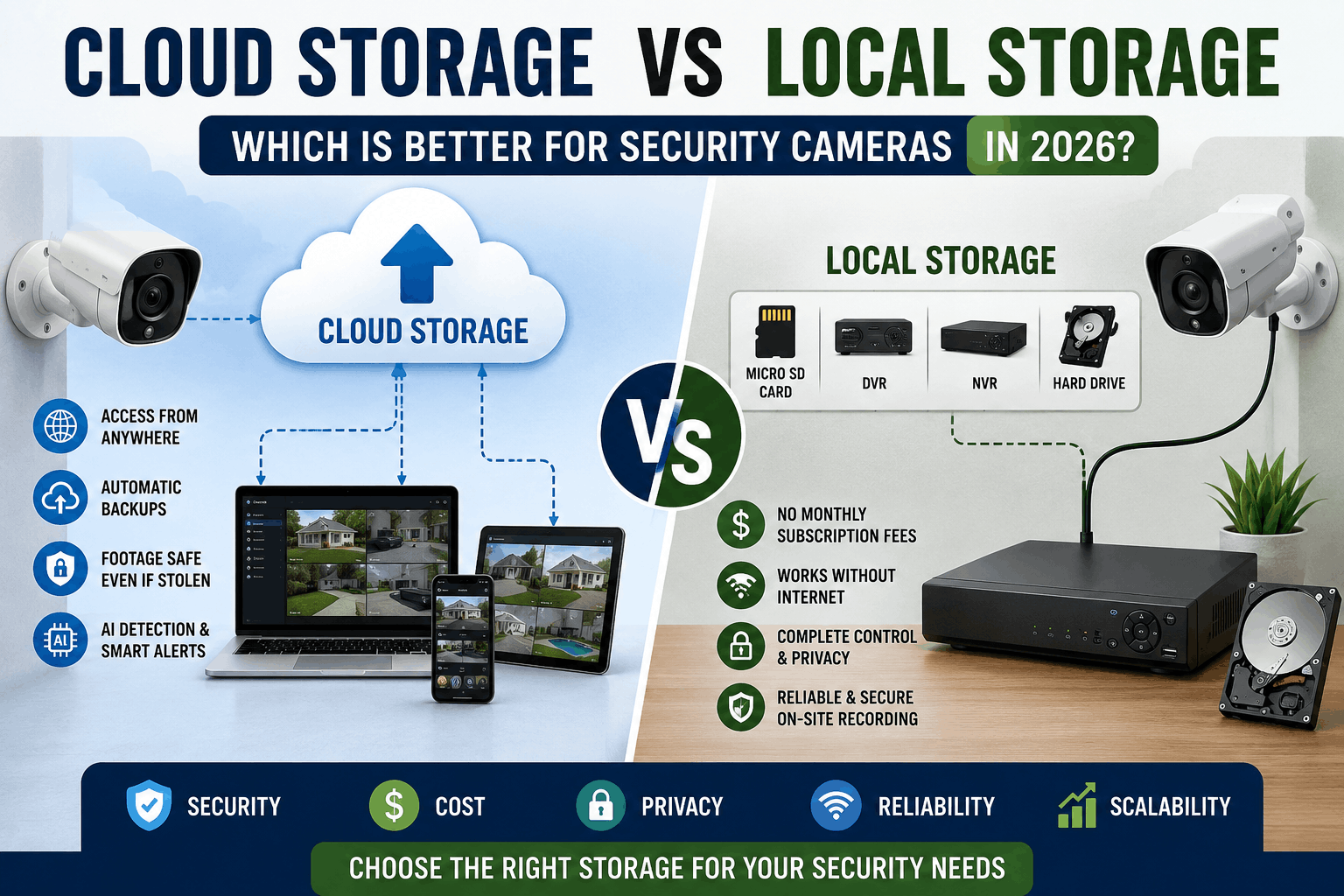
If you take cloud storage, it provides remote access and automatic backup, whereas local storage gives you complete control without ongoing subscription fees.
In this guide, I will compare cloud storage vs local storage and cover their cost, security, reliability, privacy, and ease of use. So that you can determine which option best suited for you.
Cloud Storage vs Local Storage: Which Is Better for Security Cameras in 2026?
What Is Cloud Storage for Security Cameras?
Cloud storage for security cameras is one of the services that securely stores the recorded data and footage on remote servers managed by a service provider, instead of a physical device in your home.
When your camera detects motion or records continuously, the footage is uploaded over the internet to the cloud. It allows you to access it from anywhere using a smartphone, computer, or tablet. It has different plans.
Many cloud storage plans also include features such as encrypted data transmission, automatic backup, video history, smart AI detection, and easy sharing clips.
You should need a monthly or annual subscription and a stable internet connection to get cloud service.
If you are in a purchasing mood, I have written a post about top 5 outdoor security cameras you don’t need a subscription, read here,
What Is Local Storage for Security Cameras?
If you choose local storage for your security cameras, it saves recorded footage directly on your physical device located at your property.
It may be a micro SD card, hard drive, solid state drive, network video recorder, or digital video recorder.
In this type of storage, videos are stored without relying on remote servers. It gives you complete control over your data.
Most of the local storage systems continue its recording even if your internet connection goes down. It makes them a reliable option for uninterrupted surveillance.
This local storage has no recurring subscription fees, but you are responsible for maintaining the storage device and backing up important footage when needed.
Cloud Storage vs Local Storage: Key Differences at a Glance
Below I have provided the key differences between cloud storage and local storage,
| Feature | Cloud Storage | Local Storage |
|---|---|---|
| Where Footage Is Stored | On remote servers managed by a cloud provider | On a microSD card, HDD, SSD, NVR, or DVR at your property |
| Upfront Cost | Usually low | Higher due to storage hardware purchase |
| Ongoing Cost | Monthly or annual subscription required for most services | No recurring subscription fees |
| Internet Requirement | Requires a stable internet connection for uploading and remote access | Can record without an internet connection |
| Remote Access | Access footage from anywhere via mobile app or web browser | Available on some systems, but often requires network setup |
| Storage Capacity | Easily expandable by upgrading your subscription plan | Limited by the size of the installed storage device |
| Data Security | Encrypted and backed up on remote servers | Fully controlled by the owner but vulnerable if the device is damaged or stolen |
| Risk of Data Loss | Low, since footage remains safe even if the camera is stolen | Higher if the recorder or storage device is stolen, damaged, or fails |
| Recording Reliability | May be interrupted if internet upload fails | Continues recording even during internet outages |
| Privacy | Data is stored on third-party servers | Data remains on your own devices, offering greater privacy |
| Maintenance | Automatic software updates and cloud management | Requires manual maintenance and storage management |
| Scalability | Easy to increase storage by changing plans | Requires purchasing additional or larger storage devices |
| Best For | Users who want remote access, backups, and convenience | Users who prefer one-time costs, offline recording, and complete data control |
| Main Drawback | Subscription costs and internet dependency | Risk of losing footage if storage hardware is damaged or stolen |
Pros and Cons of Cloud Storage
Pros
- Access recorded footage from anywhere using a smartphone or computer.
- Automatically backs up videos to protect against theft or device failure.
- Storage capacity can be expanded by upgrading your subscription plan.
- Many services offer AI features like person, vehicle, and package detection.
- Automatic software updates and minimal maintenance.
Cons
- Most providers charge monthly or annual subscription fees.
- Requires a stable internet connection for uploading footage.
- Slow internet may delay video uploads or playback.
- Privacy depends on the provider’s security practices.
- Long-term subscription costs can exceed the price of local storage hardware.
Pros and Cons of Local Storage
Pros
- No monthly or annual subscription fees after the initial purchase.
- Continues recording even if the internet connection is unavailable.
- Gives you complete control over where your video footage is stored.
- Offers better privacy since data remains on your own devices.
- Ideal for users who prefer a one-time investment.
Cons
- Storage capacity is limited by the size of the SD card or hard drive.
- Footage can be lost if the storage device is stolen or damaged.
- Requires manual backups to protect important recordings.
- Hardware may need replacement over time due to wear.
- Remote access can require additional setup or compatible equipment.
Which Storage Option Offers Better Security and Privacy?
First, you need to choose your priorities before deciding the best storage option.
If you take cloud storage, it offers strong security through encryption, automatic backup, and secure data centers, which makes it less likely that you will lose your footage if your camera or recorder is stolen.
However, your recorded camera videos are stored in third-party servers. So you must trust the providers’ privacy and security practices.
If you choose local storage, it keeps all footage on the device you already own. It gives you a greater control over your data and privacy.
The trade-off is that the recordings can be lost if the storage device is damaged, fails, or is stolen, unless you regularly create backup copies.
Which Storage Option Is Best for Different Types of Users?
| User Type | Recommended Storage Option | Why It’s the Best Choice |
|---|---|---|
| Homeowners | Cloud + Local (Hybrid) | Provides automatic cloud backups while keeping a local copy for added security and reliability. |
| Apartment Renters | Cloud Storage | Easy to set up, requires minimal hardware, and allows remote access without installing bulky recording devices. |
| Small Business Owners | Hybrid Storage | Ensures continuous recording with local storage while protecting footage through off-site cloud backups. |
| Large Businesses | Local Storage (NVR/DVR) + Cloud Backup | Handles multiple cameras efficiently and provides disaster recovery with cloud backups. |
| Budget-Conscious Users | Local Storage | Eliminates recurring subscription fees after the initial hardware purchase. |
| Frequent Travelers | Cloud Storage | Lets you monitor your property and review footage from anywhere with an internet connection. |
| Privacy-Focused Users | Local Storage | Keeps recordings on your own devices, giving you greater control over your personal data. |
| Smart Home Users | Cloud Storage | Integrates easily with smart home platforms and often includes AI-powered alerts and automation. |
| Vacation Home Owners | Cloud Storage | Provides remote access and secure off-site backups for properties that are often unoccupied. |
| Users Needing Maximum Reliability | Hybrid Storage | Combines the benefits of uninterrupted local recording with secure cloud backups for the highest level of protection. |
Which Is More Cost-Effective in the Long Run?
Do you know which is the more cost-effective in the long run?
It is local storage.
Yes, local storage is generally more cost-effective over the long run because it requires a one-time investment in storage hardware.
It may be a micro SD card, DVR, or NVR without any ongoing subscription fees.
But eventually, you need to replace storage devices.
The overall cost is often lower than paying monthly cloud storage charges for several years.
If you choose cloud storage, however, it offers added value through automatic backup, remote access, and advanced features like AI detections, which may justify the recurring expenses for some users.
First, you should choose your budget, convenience needs, and desired level of protection. After that, you can easily choose your best choice.